Workflow Automation
Self-Hosted n8n
Deployed a fully self-hosted automation platform using Docker, secured it with SSL and MFA, and exposed it to the internet via Cloudflare Tunnel, unlocking OAuth integrations, webhook callbacks, and API connectivity without exposing a single port.
Skills Applied
What This Project Demonstrates
IAM Relevance
Identity & Access in Practice
This project required hands-on implementation of IAM concepts that go beyond textbook definitions.
Third-Party Authorization
Configured OAuth-based integrations within n8n workflows, requiring the platform to be publicly reachable so external services could complete authorization flows. This involved understanding token exchange, callback URLs, and scope delegation.
Event-Driven Authentication
Implemented secure inbound webhooks so external services could trigger automation workflows. Configured webhook endpoints, validated payloads, and ensured traffic integrity through Cloudflare's encrypted tunnel.
Credential & Key Management
Managed API keys and credentials across multiple service integrations within n8n, applying the principle of least privilege. Each connection was granted only the access it needed, stored securely in environment variables rather than hardcoded.
Multi-Factor Authentication
Enabled MFA on the n8n instance to prevent unauthorized access to the automation platform. Combined with basic authentication and Cloudflare's access controls to enforce layered identity verification.
Use Case
What Was Automated
The infrastructure wasn't built for its own sake. It was built to run a real AI agent with real access to sensitive data.
The agent was designed to read incoming emails and act on their contents autonomously. Using Gemini as the reasoning layer and n8n as the orchestration engine, the workflow gave the agent full read and write access to Gmail, Google Contacts, and Google Calendar.
Because this required delegating broad OAuth scopes (read mail, send mail, manage contacts, manage calendar events), a dedicated isolated account was created specifically for this agent. If the account or API key was ever compromised, no personal data or primary accounts were at risk. The blast radius was contained by design.
The Gemini API key was scoped only to this workflow and stored in environment variables, never in source code.
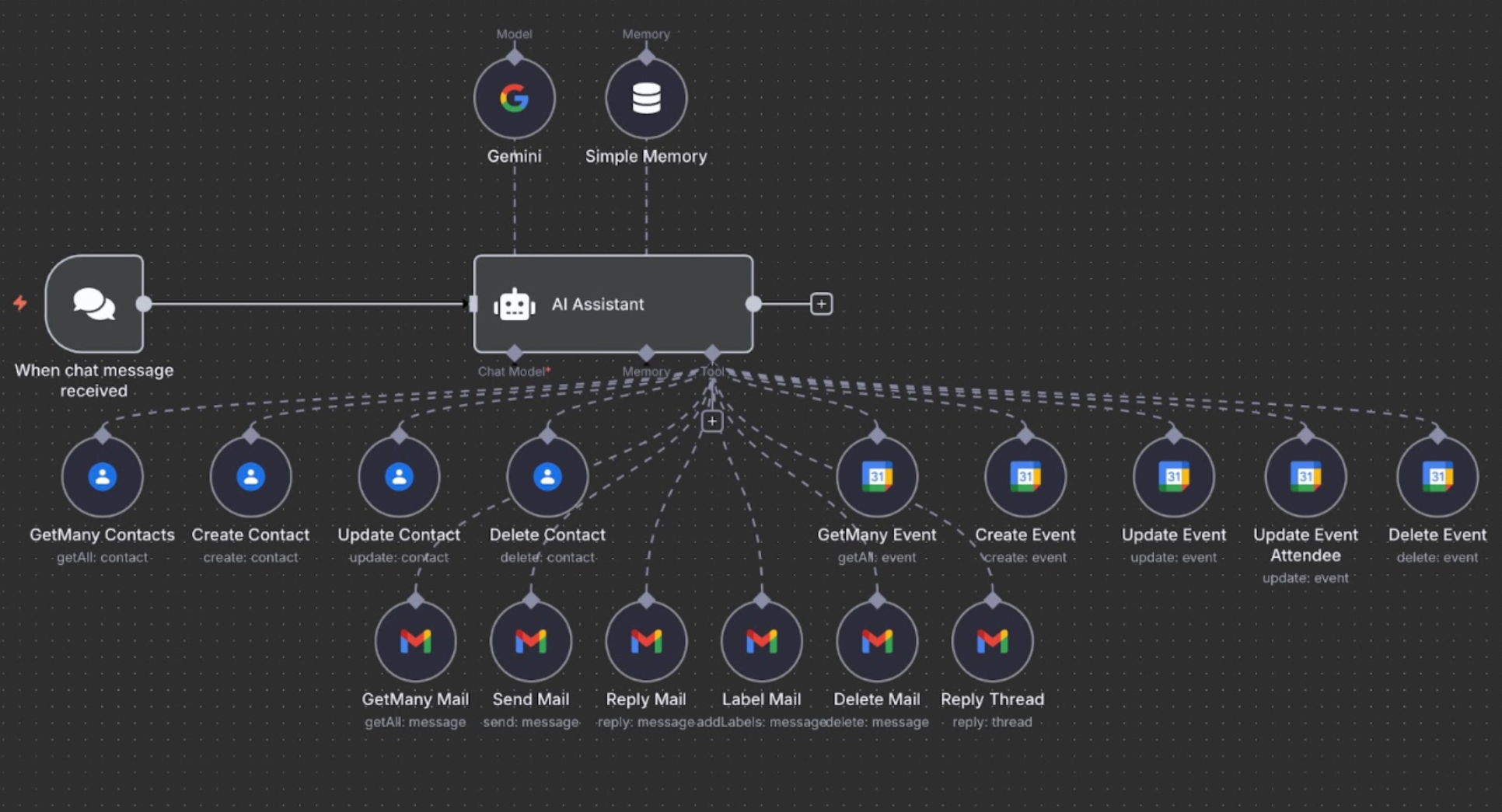
Live n8n workflow: AI agent with full Gmail, Contacts, and Calendar access
Gap Analysis
Identifying and Closing the Gaps
Before deployment was complete, this infrastructure had real, exploitable weaknesses. Each one was identified and addressed deliberately.
.env files with no access controls beyond file permissions.
Environment variables isolated per service. Keys scoped to minimum required access and never committed to source control.
Build Process
How It Was Built
Why Self-Host?
n8n's paid service model limited hands-on experimentation. Self-hosting provided full access to all nodes, integrations, and configurations, learning by doing rather than by watching. The goal was full data ownership and the ability to explore advanced automation in a controlled environment.
Docker Deployment
Packaged n8n inside a Docker container to ensure a consistent, isolated environment. Configured Docker volumes for data persistence, and used environment files (.env) to control service behavior. The .env file acts as the rulebook for how services behave across different environments.
LAN Accessibility
Reconfigured the environment settings to bind n8n to the host machine's private IP rather than localhost, allowing any trusted device on the local network to access the platform. This surfaced a key lesson: understanding network binding is essential before any exposure strategy.
SSL Encryption (Local)
Generated and configured self-signed SSL certificates to encrypt local traffic. Pointed n8n to the certificates via the .env file. Key takeaway: even internal traffic should be encrypted, and browsers will warn on untrusted certs, but the transport layer is secure.
Cloudflare Tunnel: Zero Port Exposure
Registered a domain, pointed it to Cloudflare's name servers, and used Cloudflare Tunnel to securely expose the local n8n instance to the internet with zero open inbound ports. This unlocked OAuth logins, webhook callbacks, and all third-party integrations that require a public endpoint.
Automation Scripts
Wrote three custom Bash scripts: one to update and restart all services, one to shut down the entire stack cleanly, and one to start everything in a consistent and predictable order, whether recovering from a power disruption or launching manually.
Security
Security Measures Implemented
Lessons Learned
Key Takeaways
Interested in what Eduardo built?
Let's talk about how this applies to your open roles.